dbt Lineage Limitations and How to Extend It Beyond the Project
- Infrasity
- November 16, 2026
TL;DR
- dbt builds its lineage graph from
ref()andsource()calls found at parse time, so a model that reads a hardcoded table name, or hides a ref inside a branch that is not evaluated during parsing, shows up in the DAG with missing parents. In a four-model test project, one hardcoded reference left a downstream model with no parents and no children. - Column-level lineage in dbt comes from SQL parsing and reflects select statements only, so joins and filters create no column edges. It is not available for Python models, and on the dbt platform it requires an Enterprise or Enterprise+ plan with Catalog access.
- Exposures show downstream consumers only when someone declares them in YAML. Automatic downstream exposures are limited to Tableau on Enterprise plans, so reverse-ETL syncs, notebooks and applications stay invisible unless a person writes them down.
- The gaps can be narrowed without replacing dbt: fix hidden dependencies, derive column edges from compiled SQL with SQLGlot, declare exposures, emit OpenLineage events with
dbt-ol, and use state-based selection for pre-merge impact checks. - What remains after that is the cross-platform and runtime picture. Callisto by Datameer joins SQL-parsed column lineage across systems to runtime metrics in a GitHub pull request impact report, and marks inferred edges and unmapped systems instead of hiding them.
For many analytics teams the dbt DAG is the first lineage graph they ever use. It appears for free once models use ref() and source(), it drives the order in which models build, and it gives reviewers a quick view of what sits upstream and downstream of a change. That is a real strength, and it explains why so many teams treat the DAG as the lineage for the whole estate.
The DAG reflects the dbt project, though, and an estate is wider than one project. A scheduled notebook, a reverse-ETL sync and a dashboard built by another team all read dbt models without appearing in dbt's graph unless someone adds them. This guide starts with what dbt lineage is, then walks through how dbt assembles it, where its native lineage stops, five practical ways to extend it with tooling you can run today, and what is still missing once you have done all five. Along the way it uses one running example, so every limitation shows up as a concrete failure rather than an abstraction.
What Lineage Is and What dbt Lineage Records
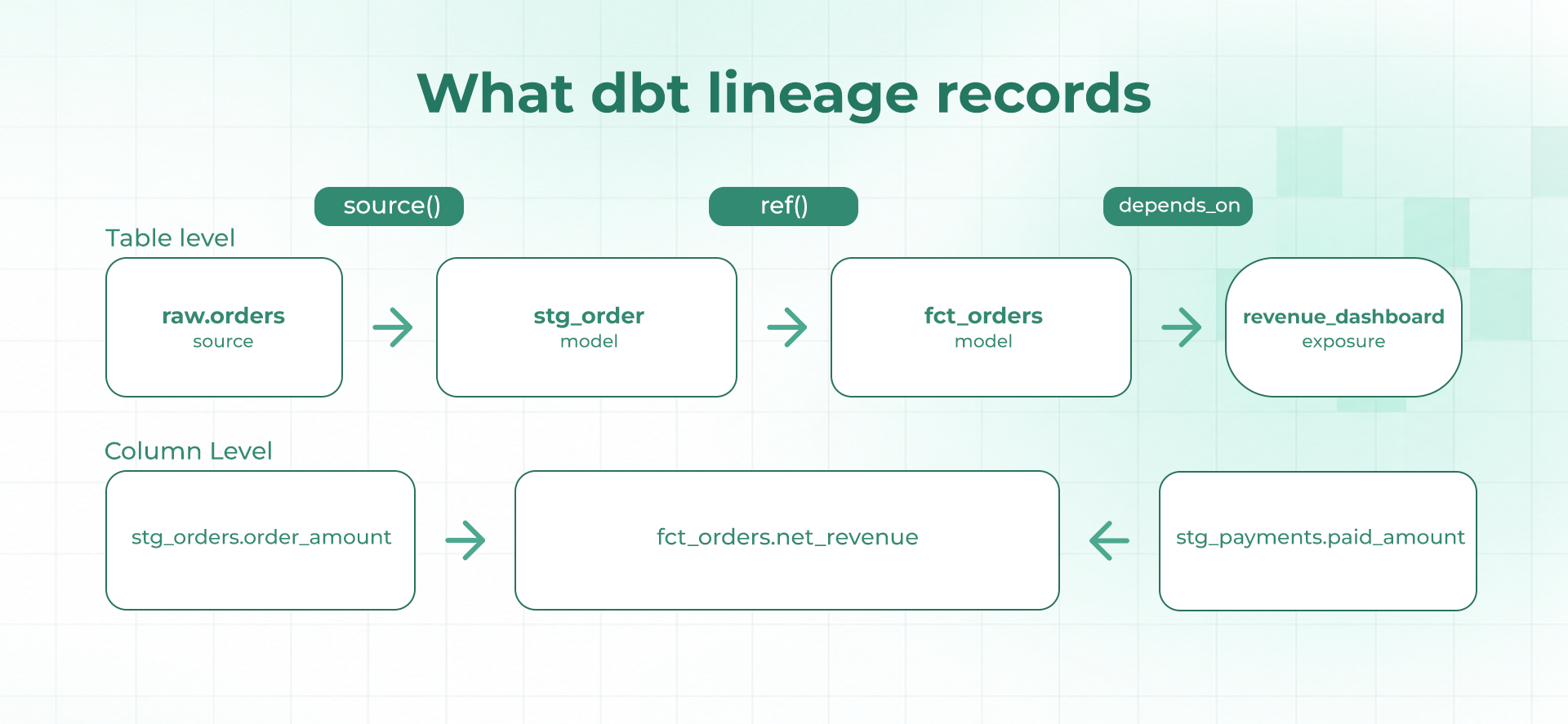
Lineage is the record of where data comes from and where it goes. For any one table, it answers two questions: what was this built from, which is the upstream side, and what is built from this, which is the downstream side. Teams usually track it at two levels of detail. Table-level lineage records which tables or models depend on which others. Column-level lineage goes one step further and records which input columns feed each output column, so a change to one column can be traced to the exact outputs it touches.
dbt lineage is the table-level kind, scoped to a dbt project. Every model, source, seed and snapshot is a node, and every dependency between them is an edge that points in one direction, from the thing being read to the thing reading it. Because no model can depend on itself through a chain of others, the result is a directed acyclic graph, usually shortened to DAG. Exposures add a final kind of node, the downstream consumer such as a dashboard, so the graph can run from raw source tables to the report an analyst opens.
Teams use the graph in three everyday ways. It sets build order, so a model always builds after the models it reads. It supports impact checks, where an engineer selects a model and everything downstream of it before changing it. And it feeds documentation: the documentation guide lists a DAG of the project among the information the generated site shows, and in the dbt platform the same lineage is viewed in Catalog. The picture below shows what one slice of the retail example records at each level of detail.
How dbt Builds Its Lineage Graph in Plain Terms
dbt works out dependencies while it parses a project, before any SQL runs. Each call to ref('stg_orders') or source('raw', 'orders') in a model tells dbt that this model depends on that resource. The documentation for ref states that dbt uses these references between models to automatically build the dependency graph, which lets it deploy models in the correct order, and that dbt discovers them all during its parse phase.
The result is written to manifest.json in the target/ directory. The manifest reference lists the top-level keys that matter for lineage: nodes for analyses, models, seeds, snapshots and tests, sources, exposures, and the two dictionaries parent_map and child_map, which hold the first-order parents and first-order children of each resource. Build order, documentation and node selection all rest on those relationships.
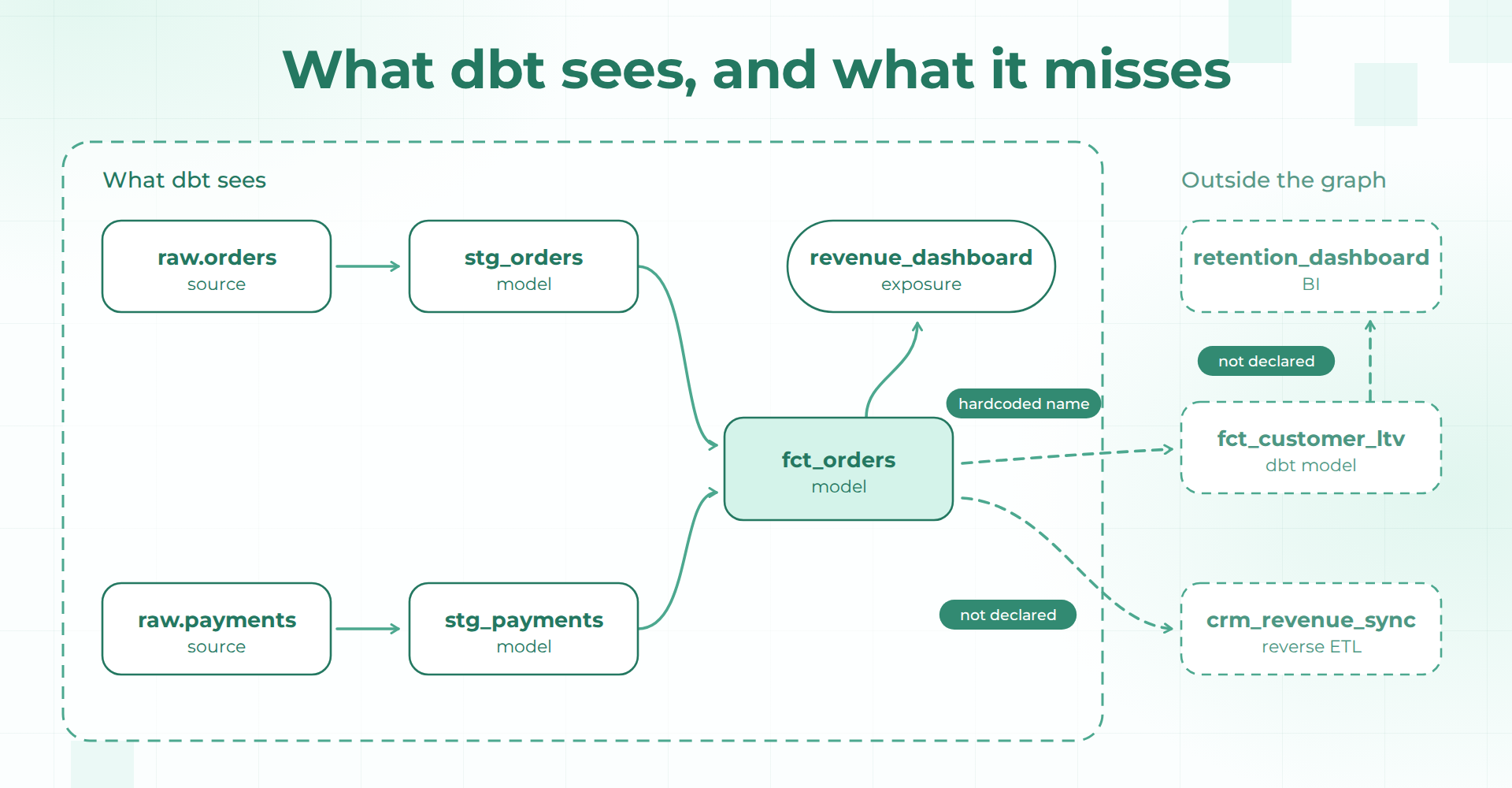
From here the guide follows one running example, a small retail project. Two sources, raw.orders and raw.payments, feed stg_orders and stg_payments. Both feed fct_orders, which calculates net_revenue. A revenue_dashboard exposure depends on fct_orders. Beyond the project sit a customer lifetime value model, a CRM sync and a retention dashboard. An engineer, helped by an AI coding assistant, is about to change how net_revenue is calculated.
Because child_map is plain JSON, the downstream question is a few lines of Python. The script below walks it breadth-first from a starting node and prints each descendant with its distance in hops. Run against stg_orders in the example project, it returns fct_orders at one hop and the revenue_dashboard exposure at two.
import json

manifest = json.load(open("target/manifest.json"))
child_map = manifest["child_map"]

def downstream(unique_id):
    seen, queue = {}, [(unique_id, 0)]
    while queue:
        node, depth = queue.pop(0)
        for child in child_map.get(node, []):
            if child not in seen:
                seen[child] = depth + 1
                queue.append((child, depth + 1))
    return seen

for node, hops in downstream("model.retail.stg_orders").items():
    print(hops, node)

# 1 model.retail.fct_orders
# 2 exposure.retail.revenue_dashboard
That answer is correct for everything dbt knows about, and it is quick to produce because the manifest already holds the edges. The rest of this guide is about what dbt does not know, starting with the gaps that live inside the project itself and moving outward to the platforms around it.
Where dbt's Native Lineage Falls Short in Practice
Dependencies Hidden From the Parser Never Reach the Graph
The graph only contains references dbt can see while parsing. The ref documentation gives the most common way to lose one: a ref placed inside a branch of an if statement that is not evaluated during parsing. Its example wraps a query in {% if execute %}, and because execute is false during parsing, dbt does not learn that the referenced model is a dependency. dbt raises an error if it later meets an unexpected ref at run time, but a model that never errors can still carry an edge the graph does not.
A related case needs no Jinja at all. When a model queries dev.main.fct_orders by name instead of ref('fct_orders'), dbt treats the string as plain SQL. In the example project, fct_customer_ltv does exactly this. After dbt parse, its depends_on list is empty and its entry in child_map is empty too. The lifetime value model reads net_revenue from fct_orders, and the DAG does not record that edge. A change to net_revenue would pass every check that relies on the graph, including a state-based selection of downstream models.
Column-Level Lineage Depends on Plan, Model Type and Query Shape
The manifest holds relationships between resources, not between columns. Column-level lineage is a separate feature, and its documentation sets several boundaries. In Catalog it requires an Enterprise or Enterprise+ plan with Catalog access. It is derived from SQL parsing, applies to models, sources and snapshots, and reflects the lineage from select statements in a model's SQL, not other usage such as joins and filters. Python models are not supported, because their nature makes it impossible to parse and determine lineage. Ambiguous or complex SQL, such as lateral joins, can produce a parsing error, and an unknown error can appear when a best practice such as using ref instead of hardcoded table names is not followed.
The same page lists a local path through dbt v2, which requires strict static analysis. The commands are dbt compile --generate-info-schema --static-analysis strict, then dbt docs generate --no-compile for the docs site or dbt show --info column_lineage on the command line. That route is useful, but the constraints carry over: the lineage still comes from parsing select statements, so what the parser cannot resolve stays unresolved.
The join and filter limit deserves attention because it shapes impact analysis. In the example, fct_orders filters on o.status = 'complete'. Rename status upstream and fct_orders breaks, yet no column edge connects the two, because the column never appears in the select list. Column lineage answers which columns feed which outputs. It does not list every column a query reads.
Downstream Consumers Appear Only When Someone Declares Them
Dashboards, notebooks and applications read dbt models, but dbt cannot see them from inside the project. Exposures exist to fill that gap. They define a downstream use of a project, such as a dashboard, application or data science pipeline, and they are declared in YAML files with a required type and owner and a depends_on list of refable nodes. dbt also creates exposures automatically for supported integrations, but those exist in dbt's metadata system and not in YAML files.
exposures:
  - name: revenue_dashboard
    type: dashboard
    owner:
      name: Analytics
    depends_on:
      - ref('fct_orders')
The coverage of that automatic path is narrow. The downstream exposures page lists Tableau as the only supported BI tool, on the Enterprise and Enterprise+ plans. Everything else, such as the CRM sync in the retail example, appears only if an engineer writes the exposure and keeps it current. A hand-written exposure is a statement of intent made on one particular day. Nothing in the project checks it against what reads the table.
Project and Platform Boundaries Cut the Graph Into Pieces
Large estates often split dbt into several projects. Project dependencies let one project reference another project's public models with a two-argument ref, and dbt surfaces the cross-project lineage in its lineage views. The feature is available on Enterprise and Enterprise+ plans, and Catalog displays only directly referenced public models from upstream projects, even when an upstream model indirectly depends on another public model.
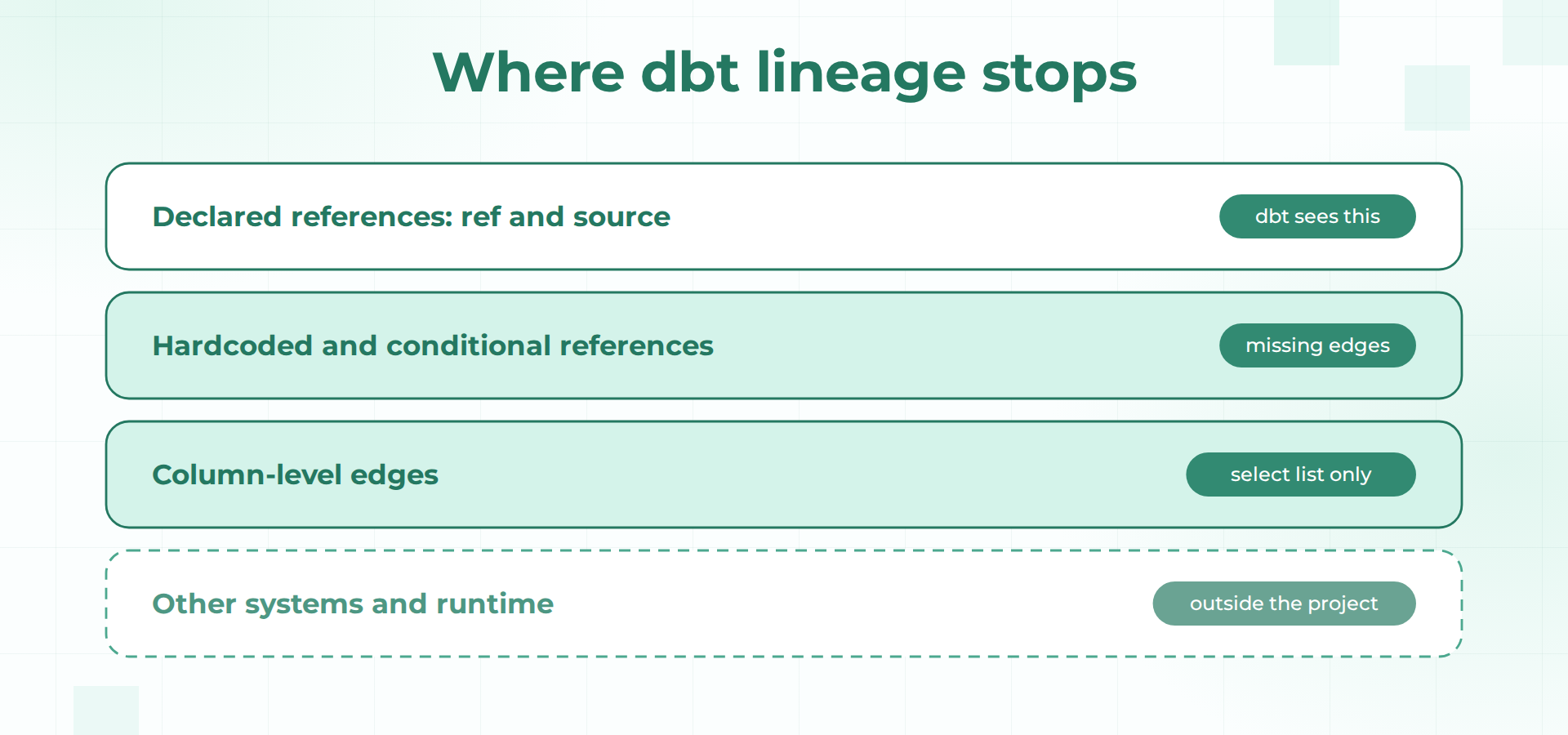
Beyond dbt itself sit the systems that run it and consume it: the orchestrator that triggers builds, the warehouse where other teams run ad hoc queries, the reverse-ETL tool and the notebooks. dbt's graph is a statement about how the project is built. It carries no record of which queries ran against a table yesterday, and no view of platforms that never touch a dbt model. The table below collects the gaps and pairs each with the extension from the next section.
| Gap | What happens in dbt | Practical extension |
|---|---|---|
| Hidden or hardcoded references | Model appears with missing parents in manifest.json | Compare compiled SQL tables with depends_on; add a --depends_on comment |
| Column edges unavailable or partial | Plan, model type and parser limits apply | Parse compiled SQL with SQLGlot and keep the edges in your own store |
| Undeclared consumers | Exposures exist only where written or automatically supported | Declare exposures in YAML and review them on a schedule |
| Other systems and runtime facts | Graph stops at the project boundary | Emit OpenLineage events with dbt-ol to join a wider graph |
| Pre-merge impact | Selection works on the graph dbt already has | Use state:modified+ with a production state directory, after the graph is complete |
Extending dbt Lineage in Five Practical Steps
Each step below keeps dbt as the source of truth for what it already models well and adds the missing pieces beside it. The first three work from files dbt already produces. The last two bring in a wider graph and use it before a change merges.
Step 1: Find and Fix Hidden Dependencies
Start by making the project's own graph complete. For a conditional ref, the documented fix is to move the reference outside the if block, inside a SQL comment. The tip on that page warns that Jinja comments are ignored by dbt's parser, while SQL comments work because dbt still evaluates Jinja inside them. In the example project, a model with a ref inside {% if execute %} had an empty depends_on list. Adding the comment line below put fct_orders into it.
--depends_on: {{ ref('fct_orders') }}For hardcoded names, the compiled SQL is the evidence. Every model's compiled_code in the manifest names the tables it reads, and each model's depends_on.nodes lists what dbt believes it reads. Any table in the first that has no match in the second is a hidden dependency. Step 2 builds that comparison into the same script that derives column edges, so one pass produces both the audit and the lineage.
Step 2: Derive Column Edges From Compiled SQL
SQLGlot, an open-source SQL parser, ships a lineage function that builds the lineage graph for a query. Called with column=None it returns a dictionary of every top-level output column to a node tree, and each node carries its downstream children and the source expression it comes from. A leaf node's source is the table, which lets you map it back to a dbt unique ID through the manifest's relation_name.
The script below does that for every model. It needs a schema so the parser can expand names, and in a real project that schema comes from catalog.json, which is generated by dbt docs generate. The example hardcodes the columns for brevity. The final comparison flags any edge whose parent is missing from the model's depends_on list.
import json
from sqlglot.lineage import lineage

manifest = json.load(open("target/manifest.json"))

# Column lists per relation. In a real project, read these from catalog.json.
schema = {"dev": {
    "raw": {
        "orders": {"order_id": "int", "customer_id": "int", "status": "text", "amount": "double"},
        "payments": {"order_id": "int", "amount": "double"},
    },
    "main": {
        "stg_orders": {"order_id": "int", "customer_id": "int", "status": "text", "order_amount": "double"},
        "stg_payments": {"order_id": "int", "paid_amount": "double"},
        "fct_orders": {"order_id": "int", "customer_id": "int", "net_revenue": "double"},
    },
}}

# relation_name -> dbt unique_id, so SQL tables resolve to graph nodes
by_relation = {
    n["relation_name"].replace('"', ""): uid
    for uid, n in {**manifest["nodes"], **manifest["sources"]}.items()
    if n.get("relation_name")
}

def column_edges(sql):
    for out_col, root in lineage(None, sql, schema=schema, dialect="duckdb").items():
        stack = [root]
        while stack:
            node = stack.pop()
            if node.downstream:
                stack.extend(node.downstream)
            else:
                table = node.source  # leaf nodes point at the source table
                relation = f"{table.catalog}.{table.db}.{table.name}"
                yield out_col, relation, node.name.split(".")[-1]

for uid, node in manifest["nodes"].items():
    if node["resource_type"] != "model":
        continue
    declared = set(node["depends_on"]["nodes"])
    print(uid)
    for out_col, relation, src_col in sorted(set(column_edges(node["compiled_code"]))):
        parent = by_relation.get(relation, relation)
        flag = "" if parent in declared else "   <- not in depends_on"
        print(f"  {out_col} <- {parent}.{src_col}{flag}")
Run against the example project, the output for the two interesting models looks like this. The net_revenue column traces to both order_amount and paid_amount, which is the detail an engineer needs before changing how it is calculated. The lifetime value model shows the two edges that the DAG never recorded, each flagged because its parent is missing from depends_on.
model.retail.fct_orders
  customer_id <- model.retail.stg_orders.customer_id
  net_revenue <- model.retail.stg_orders.order_amount
  net_revenue <- model.retail.stg_payments.paid_amount
  order_id <- model.retail.stg_orders.order_id
model.retail.fct_customer_ltv
  customer_id <- model.retail.fct_orders.customer_id   <- not in depends_on
  lifetime_value <- model.retail.fct_orders.net_revenue   <- not in depends_on
Two caveats keep this honest. The parser follows select expressions, so status does not appear for fct_orders, exactly as with dbt's own feature. And a query such as select * against a table missing from the schema cannot be expanded, so those edges should be stored with a flag that says they were inferred or unresolved, not recorded as certain.
Step 3: Declare Consumers and Review Them on a Schedule
Write an exposure for every dashboard, sync or notebook you know reads a dbt model, using the YAML shown earlier. The useful habit is the review. Pull the list of exposures from the manifest each quarter, and compare it with the consumers you can find in other ways, such as BI tool inventories and warehouse query history, which are independent of what the project declares. Once an exposure exists, dbt run -s +exposure:revenue_dashboard builds and tests everything upstream of it, which turns the declaration into something the project enforces.
Step 4: Emit OpenLineage Events to Join a Wider Graph
The OpenLineage project ships a dbt integration that reads the artifacts from the target/ directory, manifest.json, run_results.json and optionally catalog.json, and emits a START and a COMPLETE or FAIL event for each executed node. Its dbt-ol command is described as a drop-in replacement for the standard dbt command. Installation is pip3 install openlineage-dbt, with OPENLINEAGE_URL required and OPENLINEAGE_NAMESPACE optional.
pip3 install openlineage-dbt
export OPENLINEAGE_URL=http://localhost:5000
export OPENLINEAGE_NAMESPACE=retail_prod
dbt-ol run
The value of this step is that dbt's events arrive in the same format as events from other tools, so a collector can join them. The integration has limits worth knowing. In its default artifact mode the dbt command must finish before lineage is emitted, and because run_results.json keeps only the last query ID per node, earlier queries for a node are dropped. A columnLineage dataset facet exists when column-level lineage parsing is enabled, but the integration page does not explain how to enable it, so confirm the behavior on your installed version before relying on it.
Step 5: Use the Complete Graph Before a Change Merges
With the hidden edges fixed and consumers declared, dbt's own selection syntax becomes more trustworthy. The + operator on the right selects a node and everything downstream of it, and state:modified+ combined with --state pointing at production artifacts selects what changed in a branch plus its descendants. In the example project, dbt ls --select fct_orders+ lists fct_orders and the revenue_dashboard exposure, and would list fct_customer_ltv once its hardcoded reference becomes a ref. The selection syntax page shows the state:modified+ form in its dbt ls examples.
# everything downstream of fct_orders
dbt ls --select fct_orders+

# modified in this branch, plus descendants, compared with production artifacts
dbt ls --select state:modified+ --state ./prod-artifacts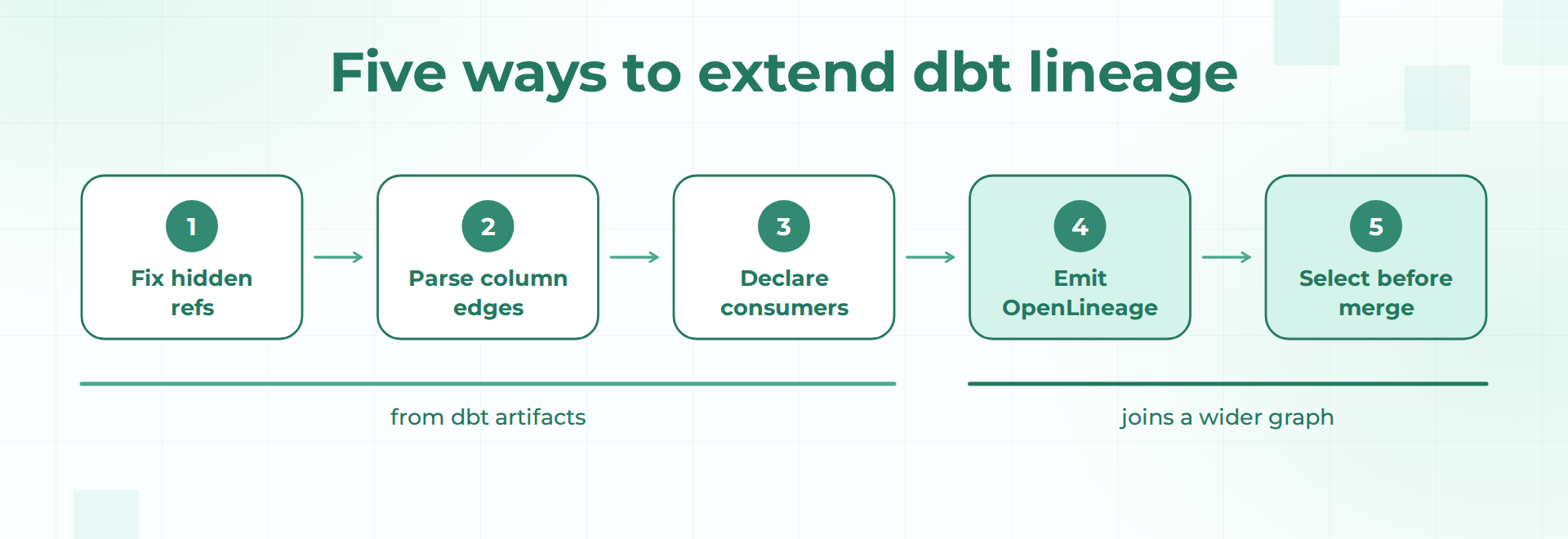
What the Extended Graph Still Cannot Tell You
After these five steps the graph is more complete, and it still has edges. The parse-based approach reads what the code says, so it cannot tell you how a change behaves once it runs. A rewritten join can leave every column edge unchanged while the model scans several times as many bytes. The graph also stops at the systems you have wired into it. A table read by a notebook on another team's platform, or by a job that never emits an event, stays invisible, and a stored procedure that builds tables from dynamic SQL gives a parser nothing static to read.
Then there is the question of other people's work. Your impact check compares your branch with production. It does not compare it with the three other branches that touch the same model this week, each of which looks safe on its own. Stitching these answers together by hand takes more effort as every system is added to the estate, and the same engineers usually do it. The next section shows how Callisto by Datameer handles the parts that remain.
How Callisto by Datameer Closes the Gaps Left After dbt Lineage
Callisto by Datameer builds a catalog and lineage graph across platforms in an estate, not inside one project. Column-level lineage is derived automatically by parsing each job's SQL, with no manual curation, which addresses the first two gaps above. Because lineage comes from the SQL a job runs, a hardcoded table name is one more table reference in the query, so an edge like the one from fct_customer_ltv to fct_orders does not depend on a declared ref. Where the parser has to guess, such as matching on a column name when no other evidence exists, the edge is marked as inferred, so a reader can tell what the system is confident about from what it is guessing.
The cross-platform gap is addressed by the catalog itself, which spans OpenLineage-emitting systems, Snowflake and other non-dbt sources. A dbt job that emits events through the integration from Step 4 lands in the same graph as the reverse-ETL sync and the BI dashboard that read its output. Callisto also flags systems it has not mapped, instead of silently ignoring them, so an answer of nothing downstream carries a visible statement about what was not checked.
The runtime gap is where the pull request flow helps. When a pull request opens on GitHub, Callisto posts an impact report that lists the downstream assets affected and compares runtime metrics between two versions of the same job: duration, result rows, result bytes, bytes scanned and records read. For the net_revenue change, that comparison shows whether the new version scans more data, in addition to which dashboards and syncs sit downstream. The same graph is available when something breaks later, through a pull request thread, Slack, web chat or a CLI, together with versioned history for point-in-time reads and operational telemetry from tools such as Datadog.
Two scope notes keep expectations accurate. The pull request flow works with GitHub today, and the system reads and reports. It does not change code or open fixes on its own. Callisto is separate from Datameer Cloud, the no-code Snowflake transformation product, and works alongside dbt's own lineage and selectors, which stay useful for what they already do well.
Keeping Extended Lineage Accurate as Projects Change
Extended lineage drifts for the same reasons the original graph does. Record where each edge came from, whether dbt declared it, a parser derived it or a runtime event reported it, and keep the timestamp of the last confirmation. A declared exposure with no recent confirmation deserves more suspicion than one backed by a recent event. Rerun the Step 2 script in CI on every pull request so a new hardcoded reference fails review the day it is written, instead of surfacing during an incident.
Track coverage too. Keep a list of systems that read your models and a list of systems that feed your graph, and treat the difference as a backlog. An answer of nothing downstream is only as good as that list. If the list is empty because nobody wrote it, the answer is a guess presented as a fact.
Common Mistakes When Extending dbt Lineage
- Treating the DAG as the whole estate. The graph reflects the project. Dashboards, syncs and other platforms need their own sources.
- Trusting hand-written exposures indefinitely. They record intent on the day they were written. Review them against warehouse query history.
- Hiding refs inside conditionals. A ref inside
{% if execute %}is invisible to the parser unless a--depends_oncomment brings it back. - Presenting inferred edges as certain. A column matched by name is a lead. Store it with a flag so the reader can weigh it.
- Ignoring joins and filters in impact checks. Column lineage from select lists will not warn you when a filter column is renamed. Search compiled SQL for the column name as well.
- Expecting column lineage from Python models. The dbt documentation lists them as unsupported, so plan a manual declaration or a separate source of truth for those models.
Where Should You Start With Your Own dbt Lineage
dbt's native lineage is accurate for what the parser sees: the references declared with ref() and source(), the consumers written as exposures, and column edges from select statements in SQL models on supported plans. Its gaps appear at the edges of that description, in hidden references, joins and filters, Python models, undeclared consumers and everything outside the project. Four of the five extensions in this guide work from files dbt already produces, which makes them cheap to try, and the fifth depends on a graph that is complete enough to trust.
Start with the audit from Step 2 on your own manifest, because it tells you how many hidden edges your DAG has today. Then decide how far to carry the rest yourself. If your estate spans more than the dbt project, you can book a Datameer demo to see column lineage and pull request impact reports across platforms, or read the guide to active metadata management for the model behind it.
FAQ
Does dbt Core include column-level lineage by default?
The manifest.json lineage in a standard project is resource-level, with first-order parents and children for each resource. Column-level lineage is documented as a Catalog feature on Enterprise and Enterprise+ plans, plus a local path through dbt v2 that requires strict static analysis. If you run a standard project and need column edges today, deriving them from compiled SQL as in Step 2 is the practical route.
Why does a model show no upstream dependencies in the dbt docs graph?
The usual causes are a hardcoded table name instead of ref() or source(), or a ref placed inside a Jinja branch that is not evaluated during parsing. Check the model's depends_on list in manifest.json. If it is empty while the SQL clearly reads other tables, replace the hardcoded name with a ref, or add a --depends_on SQL comment for the conditional case.
Can OpenLineage give me column-level lineage for dbt models?
The OpenLineage specification defines a column lineage facet, and the dbt integration lists a columnLineage dataset facet that is emitted when column-level lineage parsing is enabled. The integration page does not explain how to turn that on, so test your installed version and compare the emitted facets with a parser-derived result before depending on them.
How should I find hardcoded table names across a large dbt project?
Compare the tables named in each model's compiled SQL with that model's depends_on.nodes in the manifest. Any table without a matching dependency is a candidate for a hidden edge. The script in Step 2 automates that comparison, and it can run in CI so a new hardcoded reference fails review instead of reaching production, where the first sign would be a stale dashboard.
Does extending lineage replace dbt Catalog or the docs site?
No. The extensions add edges and context the native views don't carry, and they feed from the same artifacts. Keep the docs site for what it shows well, such as descriptions, tests and the project DAG, and use the extended graph for questions that cross the project boundary.