Metadata Management Tools for AI Agents: How to Choose One
- Infrasity
- November 13, 2026
TL;DR
- Gartner predicts that through 2026 organizations will abandon 60% of AI projects unsupported by AI-ready data, and says organizations with basic or manual metadata management practices will struggle to make their data AI-ready. Metadata is now an input to AI work, and a tool for reading it should be chosen with that in mind.
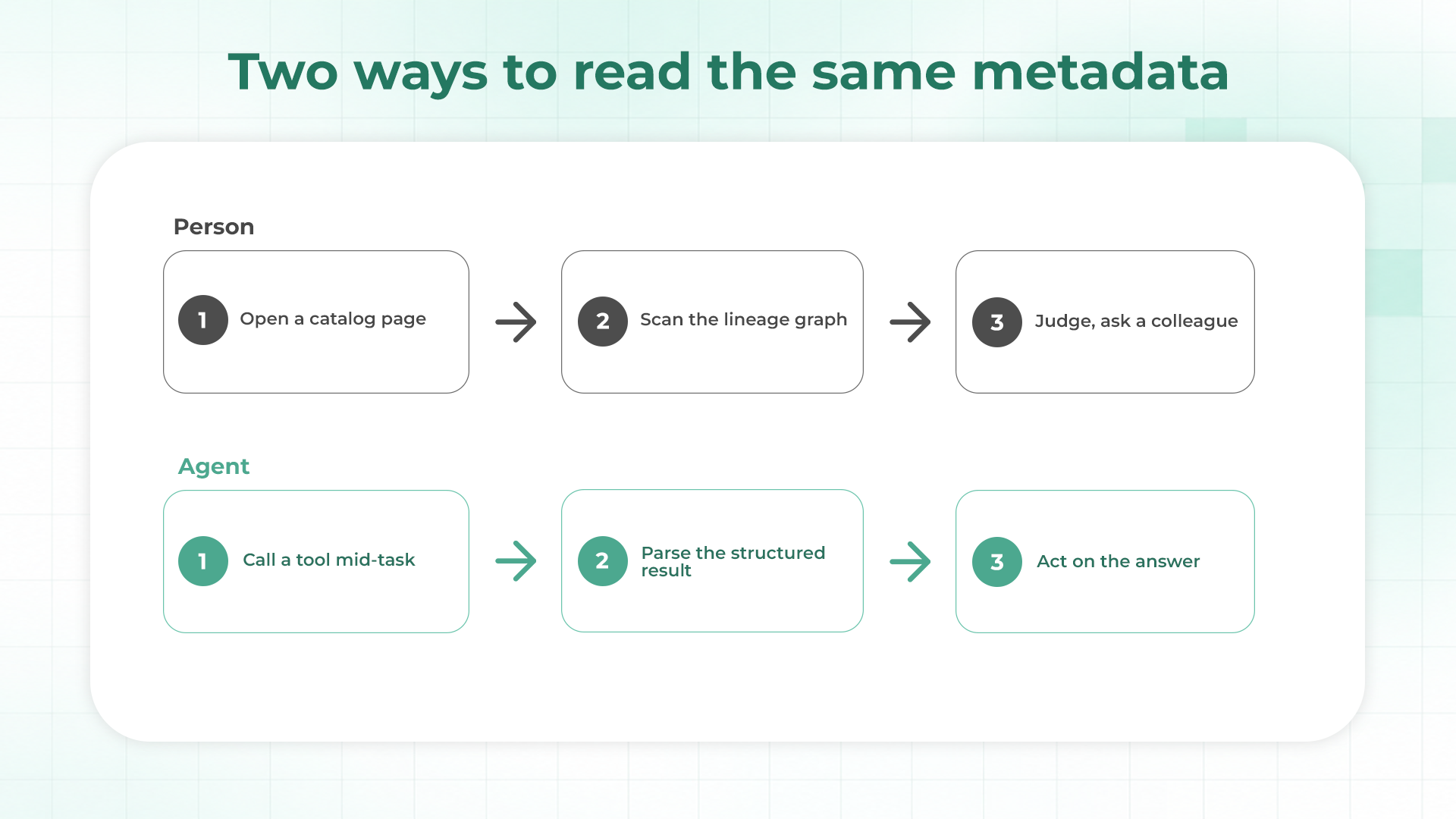
- A person reads metadata through a page and judges it. An agent reads it through a tool call in the middle of a task and acts on whatever comes back, so a stale edge, a guessed edge or a silent gap goes straight into a decision.
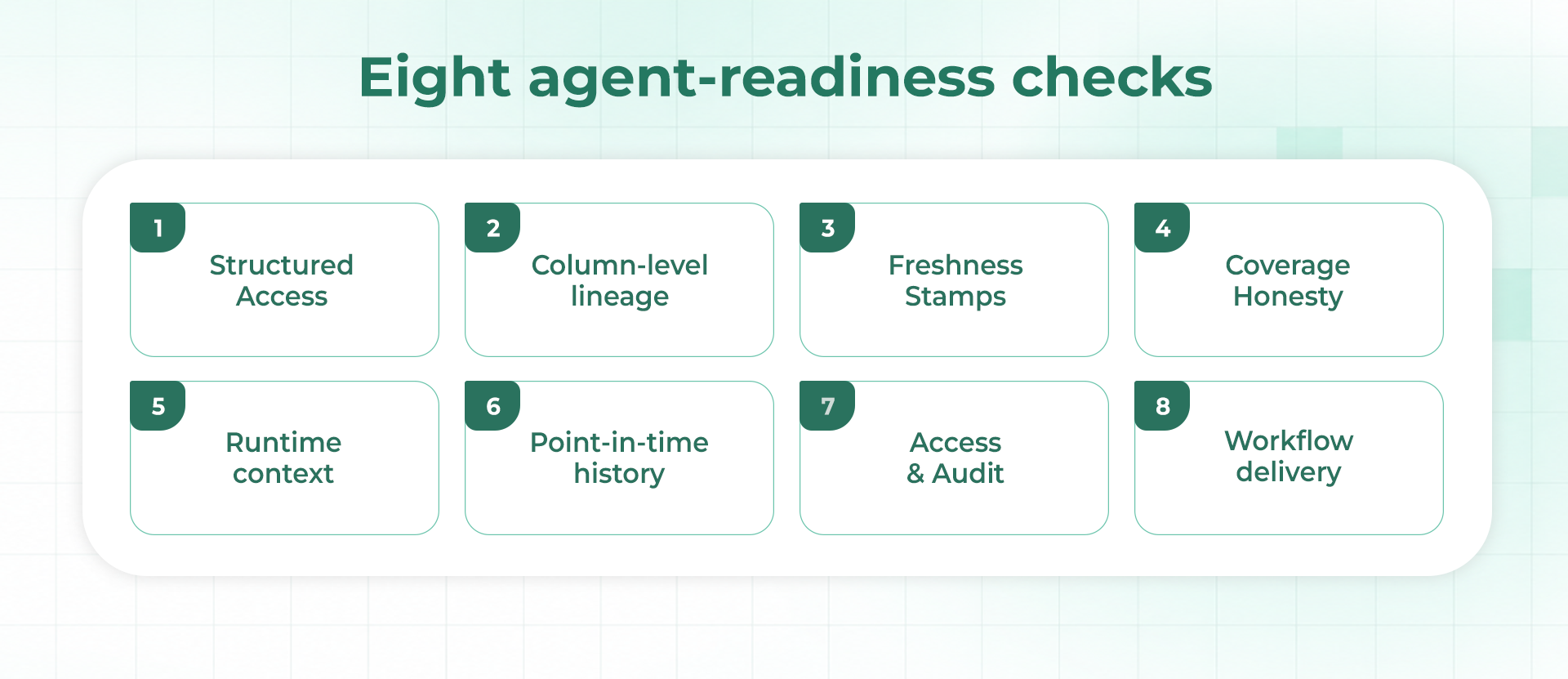
- Eight checks separate tools that agents can use well: structured access, column-level lineage with provenance, freshness stamps, coverage honesty, runtime context, point-in-time history, access control with audit, and delivery inside the engineering workflow.
- Test candidates against your own estate. Hand-verify a golden set of lineage edges, score each tool for precision and recall, check whether guessed edges are labeled, and replay real pull requests over two weeks.
- Callisto by Datameer is built around the pull request case: SQL-parsed column lineage with inferred edges marked, cross-platform coverage, runtime metrics compared between job versions, and unmapped systems flagged. If you are shopping mainly for a glossary or a discovery portal for analysts, that is a different category.
AI coding tools now draft a growing share of pipeline changes, and each change still needs someone to know what it touches. The agent writing the change can read the file in front of it and little else. What sits downstream of a column, how long the job takes today, whether the warehouse cost will move: that context lives in a catalog, an orchestrator, a warehouse and other people's branches. Whether an agent can reach it depends largely on the metadata tool behind it.
This guide takes the agent as the reader. It explains what metadata management tools do, how an agent's needs differ from a person's, and eight criteria you can test in a trial. It then sets out a two-week evaluation method, and where Callisto by Datameer sits against the criteria. The guide is written for engineering teams whose agents need to ask what a change will break. Teams shopping mainly for a business glossary or an analyst discovery portal have different needs, and the criteria below will fit them less well.
What Metadata Management Tools Do in Plain Terms
Metadata is data about data. Technical metadata includes schemas, column types and lineage, the record of which assets feed which. Business metadata includes owners, definitions and classifications. Operational metadata records runs: when a job executed, how long it took, how many rows it returned and how much data it scanned. A metadata management tool collects these from the systems in an estate, connects them and makes them available to whoever needs an answer.
Open standards help with the collecting. OpenLineage defines a generic model of datasets, jobs and runs, with facets that attach extra metadata to each, so different systems can report lineage in one format. Tools differ in how many such feeds they accept and in what they do with them once they arrive.
This guide follows a retail analytics team that runs Snowflake, dbt, Airflow, a BI tool and a reverse-ETL sync. An engineer, working with an AI coding assistant, wants to change how net_revenue is calculated in fct_orders. Before the change merges, the assistant needs three answers. What reads this column, including things outside the dbt project? Will the new version run longer or scan more data? Is anyone else changing the same model? A tool that answers only the first question from a catalog page leaves the other two unanswered.
How Agents Read Metadata Differently From People
A person opens a catalog page, scans the lineage graph, notices that a badge looks old, and asks a colleague when the table last loaded. An agent does none of that. It calls a tool in the middle of a task, parses the result and carries on. The difference sounds small, and it changes what a tool has to provide.
- Interface. MCP, the Model Context Protocol, is an open-source standard for connecting AI applications to external systems, and many assistants and developer tools support it. A tool that offers a web page and nothing else gives an agent nothing to call.
- Ambiguity. A person fills gaps with judgment and a quick question. An agent sees only what the response contains, so missing context has to be in the response.
- Silence. A person who sees an empty lineage graph wonders why. An agent that receives an empty list may conclude that nothing is downstream, which is the most dangerous wrong answer in impact analysis.
- Volume. An agent may ask many questions while it works on one change, so answers have to be quick, consistent and cheap to request.
- Consequence. A person's reading ends in a decision made by a person. An agent's reading can end in a pull request or a message to a team, so a wrong edge travels further before anyone checks it.
These five differences are the basis for the criteria in the next section. Each criterion asks whether a tool supplies, in a form an agent can use, something a person would normally supply by judgment, and the first one asks whether the agent can reach the tool at all.
Eight Criteria for Choosing a Metadata Tool Built for Agents
The table below summarizes the eight checks. Each has a question to put to every candidate and a description of what a strong answer looks like. The sections after the table give the reasoning behind each check and a way to test it in a trial.
| Criterion | Question to ask | Strong answer looks like |
|---|---|---|
| 1. Structured access | Can an agent query it without a browser? | API, MCP server or CLI with typed inputs and outputs |
| 2. Column-level lineage | How are column edges derived? | Parsed from SQL or observed at runtime, with the method recorded per edge |
| 3. Freshness stamps | When was each answer last confirmed? | Timestamp and source returned with every result |
| 4. Coverage honesty | What happens for systems you do not cover? | Unmapped systems are listed, not silently ignored |
| 5. Runtime context | Does it know how jobs behave when they run? | Duration, rows, bytes scanned, comparable across job versions |
| 6. Point-in-time history | Can it answer for a past date? | Versioned metadata with as-of reads |
| 7. Access and audit | Who can ask what, and is it logged? | Scoped permissions and a record of every agent call |
| 8. Workflow delivery | Where does the answer appear? | In the pull request, chat or CLI where the engineer already works |
1. Structured Access Through an API, MCP or CLI
Start with the plainest question: can an agent call it. The MCP tools specification lets a server expose tools that a model can discover with a tools/list request and invoke with tools/call. Each tool carries an inputSchema, and it may carry an outputSchema, in which case the server must return structured results that conform to it. For metadata, that is the difference between a typed list of downstream columns and a paragraph of prose the agent has to interpret. MCP is one route. A documented API or a CLI that prints JSON can meet the same need, and the test is whether the answer arrives in a shape code can read.
{
  "name": "get_downstream_columns",
  "description": "List columns derived from a given column",
  "inputSchema": {
    "type": "object",
    "properties": { "column": { "type": "string" } },
    "required": ["column"]
  },
  "outputSchema": {
    "type": "object",
    "properties": {
      "edges": { "type": "array" },
      "last_confirmed": { "type": "string" },
      "unmapped_systems": { "type": "array" }
    }
  }
}
The definition above is illustrative, and the tool name is invented. The fields are the ones the specification defines, and the three output properties show what to look for in a real lineage tool: the edges, a freshness stamp and a list of what was not covered.
2. Column-Level Lineage With the Method Recorded
Table-level lineage says which tables depend on which. Column-level lineage says which input columns feed an output, and it is what lets an engineer narrow a change in net_revenue to the consumers that read that column. Ask how the edges are produced. Declared edges come from what a tool says it did, observed edges come from what the warehouse recorded, and parsed edges come from reading the query text. Guessed edges, such as a match on column name alone, should be labeled as guesses. A tool that records the method per edge lets an agent, and the person reviewing its work, weigh each answer.
Also ask what the lineage leaves out. Parsers that follow select expressions do not record columns that appear only in joins and filters, so a renamed filter column can break a model without showing up as an edge. A good vendor will tell you this up front and explain how it handles the case.
3. Freshness Stamps on Every Answer
Every feed has latency. Snowflake's ACCESS_HISTORY view states that its latency may be up to 180 minutes, so an edge learned from warehouse history can trail reality by three hours. That is acceptable when the answer says so. The test is whether each result carries the time it was last confirmed and the feed it came from, so an agent can decide whether to trust it, ask again later or tell the engineer the answer may be stale.
4. Coverage Honesty for Systems Nobody Mapped
Every estate has systems the tool does not cover yet: a stored procedure that builds tables from dynamic SQL, a notebook on another team's platform, a job that emits no events. A tool that ignores them returns a clean-looking answer that is incomplete. Ask whether it keeps a list of systems it has detected but not mapped, and whether that list appears in the answer. For an agent, a response that says nothing is downstream and also names two unmapped systems carries very different information from one that says nothing is downstream and stops.
5. Runtime Context Beside the Lineage
A change can leave every edge in the graph untouched and still hurt. A rewritten join might keep the same columns while scanning several times as much data. Ask whether the tool holds operational facts for each job, such as duration, result rows, result bytes, bytes scanned and records read, and whether it can compare two versions of the same job. Most lineage answers describe structure. This check asks whether the tool can also describe behavior, because cost and runtime regressions are the changes that structure alone cannot reveal.
6. Point-in-Time History for Investigation
The question after an incident is rarely about today. It is what depended on this column before last Tuesday's deploy, and what changed. Ask whether the tool versions its metadata and can answer as of a past date. Without that, an agent investigating a failure can describe the estate as it is now and has no way to show what it looked like when the failure started.
7. Access Control and an Audit Trail for Agent Calls
An agent that can query a tool can usually query it often and broadly, so permissions carry more weight than they do for a human with a login. MCP's security guidance recommends a least-privilege scope model that starts with a minimal set of low-risk read operations and adds privileges when needed, and it notes that poor scope design obscures audit trails. Ask a candidate which scopes it offers, whether read and write are separate, and whether each agent call is logged with who asked and what came back. Ask this of every vendor, including the one you like best.
8. Delivery Inside the Engineering Workflow
Metadata that lives in a separate portal gets consulted when someone remembers to open it. An agent working on a pull request needs the answer in that thread, and a person needs to read the same answer there. Ask where results appear: a pull request comment, a Slack message, a chat window or a command line. The most useful answers are the ones that arrive at the moment of review without anyone asking for them.
How to Test Candidate Tools Against Your Own Estate
Demos use clean data, so the only reliable test is your own estate. Start with a golden set: twenty to fifty column-level edges that you have verified by hand from recent, real changes, including at least a few that cross a platform boundary or sit in a hardcoded query. Then ask each tool for the same edges and score what comes back. The script below computes precision and recall and checks one thing most scorecards omit, which is whether wrong edges were labeled as guesses.
golden = {
    ("fct_orders.net_revenue", "stg_orders.order_amount"),
    ("fct_orders.net_revenue", "stg_payments.paid_amount"),
    ("fct_orders.customer_id", "stg_orders.customer_id"),
    ("fct_customer_ltv.lifetime_value", "fct_orders.net_revenue"),
}

# What the tool returned: (output_column, source_column, label)
returned = [
    ("fct_orders.net_revenue", "stg_orders.order_amount", "parsed"),
    ("fct_orders.net_revenue", "stg_payments.paid_amount", "parsed"),
    ("fct_customer_ltv.lifetime_value", "fct_orders.net_revenue", "inferred"),
    ("fct_orders.customer_id", "stg_payments.order_id", "inferred"),  # wrong edge
]

found = {(o, s) for o, s, _ in returned}
tp = found & golden
precision = len(tp) / len(found)
recall = len(tp) / len(golden)
wrong = found - golden
wrong_but_certain = [e for e in returned if (e[0], e[1]) in wrong and e[2] != "inferred"]

print(f"precision {precision:.2f} recall {recall:.2f}")
print("missed:", sorted(golden - found))
print("wrong:", sorted(wrong))
print("wrong edges presented as certain:", wrong_but_certain)

# precision 0.75 recall 0.75
# missed: [('fct_orders.customer_id', 'stg_orders.customer_id')]
# wrong: [('fct_orders.customer_id', 'stg_payments.order_id')]
# wrong edges presented as certain: []
The sample output shows a tool with 0.75 precision and 0.75 recall that still behaved well, because its one wrong edge carried an inferred label. A tool with the same scores that presented the wrong edge as certain would be a worse choice, since an agent cannot tell the two apart without the label. The first tool is safer to build on even though the numbers are identical.
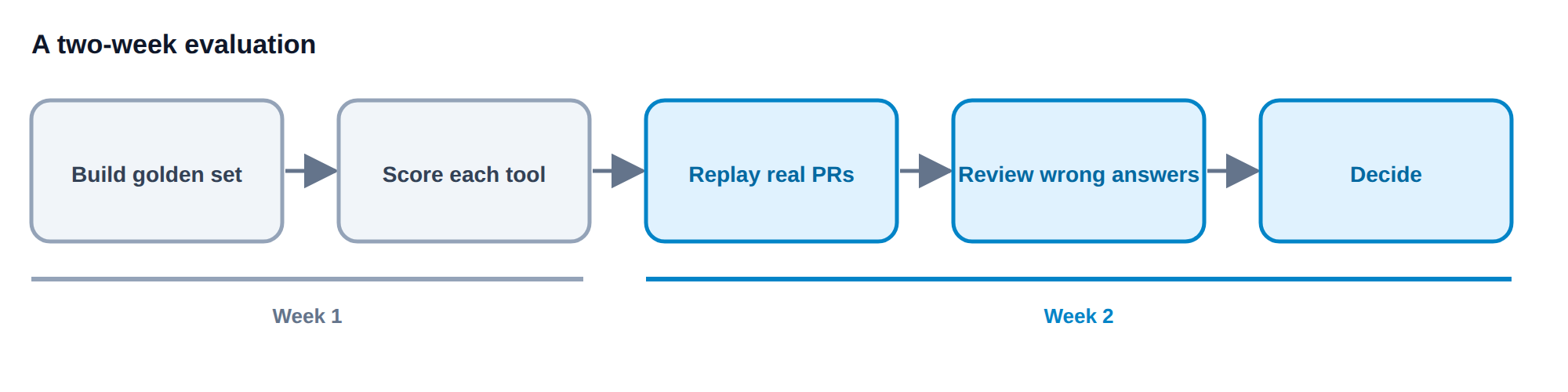
The rest of the evaluation takes two weeks. In week one, build the golden set and score every candidate. In week two, replay several real pull requests from the past month through each tool, compare what it reports with what the reviewers found, and review every wrong or missing answer with the vendor. Close by scoring the eight criteria, giving extra weight to the ones your incidents have pointed to.
How Callisto by Datameer Maps to the Eight Criteria
The approach in Callisto by Datameer was built around the question an agent asks before a change merges: what will this break, across every platform. Against the criteria, the mapping is direct for most of them. Column-level lineage is derived automatically by parsing each job's SQL, with no manual curation, which answers criterion 2. Where the parser has to guess, such as matching on column name when nothing else is known, the edge is marked as inferred so a reader can separate confident edges from guesses, which is the labeling the scoring script above checks for.
Coverage is cross-platform. The catalog spans OpenLineage-emitting systems, Snowflake and other non-dbt sources, and Callisto flags systems it has detected but not mapped instead of ignoring them, which answers criterion 4. Runtime context is where the pull request flow is strongest. When a pull request opens on GitHub, Callisto posts an impact report that compares runtime metrics between two versions of the same job: duration, result rows, result bytes, bytes scanned and records read. For the net_revenue change, that shows whether the new version scans more data, in addition to which assets sit downstream, and it answers criterion 5.
Access follows the workflow. Engineers and agents can ask questions in the pull request thread, in Slack, in web chat or through a CLI, which answers criteria 1 and 8. Metadata is versioned with point-in-time reads, so an investigation can ask what the estate looked like before a change, and the agent can reach operational telemetry from tools such as Datadog in the same context as the lineage data, which answers criterion 6 and adds to criterion 5.
Some limits are worth stating plainly. The pull request flow works with GitHub today, and Callisto reads and reports without changing code or opening fixes. Overlap detection between changes from different teams is still maturing and currently gives recency warnings, not full in-flight collision detection. Freshness reporting and access control are the two criteria to press on in any evaluation, including this one, because the details decide whether they meet your requirements. And because Callisto is aimed at engineering teams working across several platforms, it is a poor fit for single-platform shops or for teams whose main need is a glossary or an analyst discovery portal.
Common Mistakes When Buying Metadata Tools for Agents
- Judging the tool by its graph screen. A polished visual says little about whether an agent can call the tool or trust the answer.
- Accepting a clean answer without a coverage list. An empty result is only meaningful if the tool also says what it could not see.
- Scoring recall and ignoring labels. Two tools with equal scores differ if only one marks its guesses.
- Testing on vendor data. Demo estates have no hardcoded queries, orphaned notebooks or legacy jobs. Yours does.
- Giving the agent write access first. Start with read-only scopes and widen them after the audit trail shows how the agent behaves.
- Skipping freshness. Metadata that is three hours old answers a question about now with an old fact. Ask for the timestamp.
Where Should You Start With Your Own Evaluation
Metadata tools built for people optimize for browsing, and tools that agents can use well optimize for answers that are structured, labeled and complete about their own gaps. The eight criteria turn that difference into questions you can put to any vendor: structured access, column lineage with provenance, freshness, coverage honesty, runtime context, history, access and audit, and delivery inside the workflow. No category passes all of them by default, which is why the test belongs on your own estate.
Start with the golden set, because building it takes a day and tells you more than a demo will. Then run the two-week replay on real pull requests. If your estate spans more than one platform and your agents are shipping pipeline changes, you can book a Datameer demo to see column lineage and pull request impact reports on your own changes, or read the guide to active metadata management for the model behind the approach.
FAQ
Does a metadata tool need an MCP server to work with AI agents?
No. MCP is a common standard for connecting AI applications to external systems, and it is widely supported, but a documented API or a CLI that returns structured JSON can serve an agent equally well. The test is whether the answer arrives in a form code can read, with a freshness stamp and a coverage note included.
How large should the golden set of lineage edges be?
Twenty to fifty hand-verified edges is a practical range for a two-week evaluation. Pick them from real recent changes, and include a few edges that cross a platform boundary, a few from hardcoded queries and a few where a column is renamed in a select list. Those are the cases where tools diverge.
Is a data catalog enough for AI agents?
It depends on the catalog. Many were designed for people discovering data, and some also offer programmatic access and column lineage. Run the eight checks against it. If the catalog fails on structured access, provenance or coverage honesty, an agent can still use it for definitions and ownership, but it will not answer what a change will break.
Why do wrong lineage edges carry more risk with agents than with people?
A person who sees a questionable edge can check it before acting. An agent may act on it directly, and its output, such as a pull request comment or a message to a team, travels to other people. Labeling guesses as inferred keeps that risk visible.
Should the agent be allowed to write back to the metadata tool?
Start with read-only access. MCP guidance recommends keeping an initial scope to low-risk read operations and adding privileges only when needed, and the MCP tools specification advises that a human should be able to deny tool invocations. Widen access after you have reviewed the audit trail from a few weeks of real use.